Data & statistics28 / 68
Style and label data points
Make each data series readable and add labels only where they help explain the result.
Find itData → table → Series appearance / Point labels & styles / Interaction & help
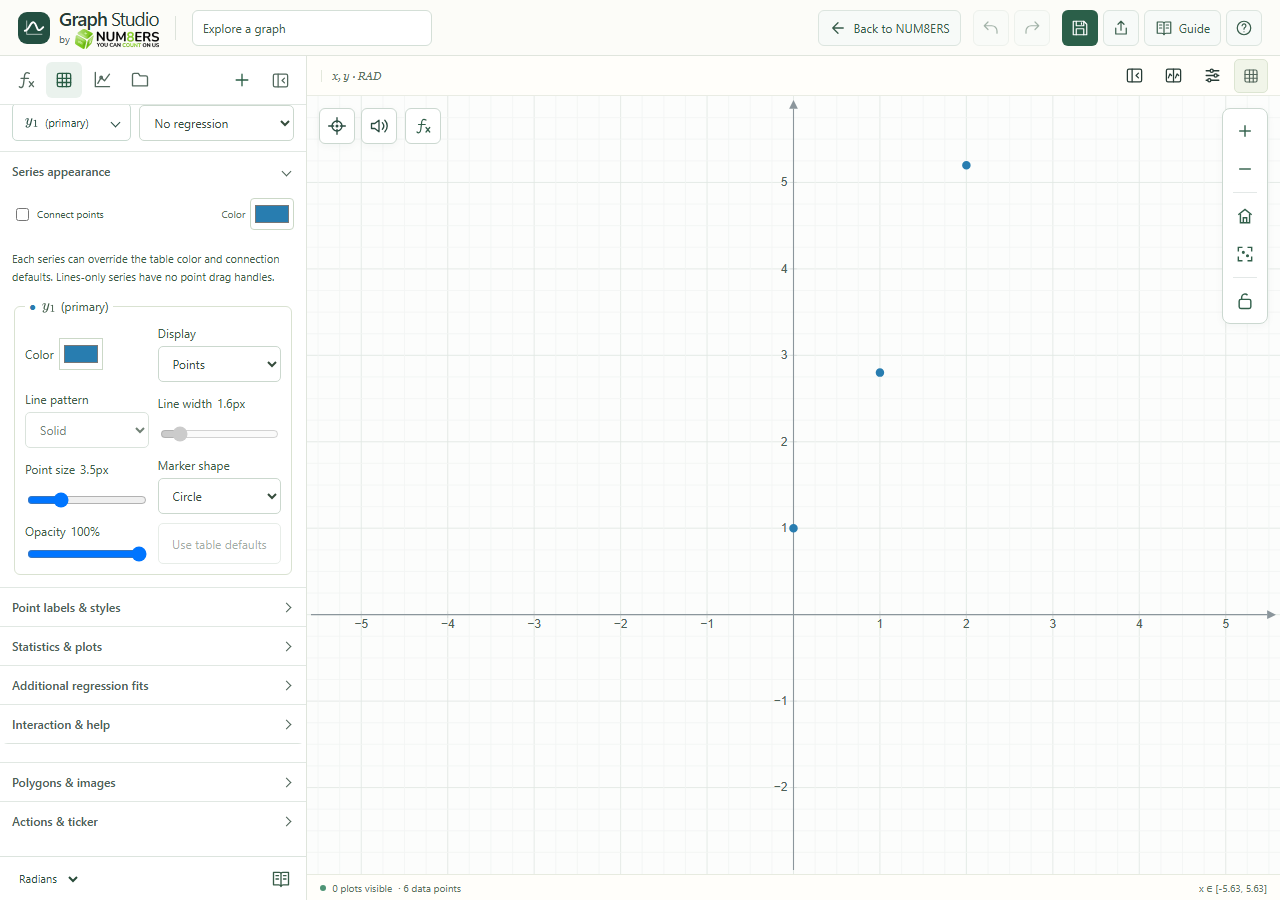 Series appearance for a demonstration data table.Click to enlarge ↗
Try it step by step
- Open Series appearance and choose the series you want to style.
- Choose points, lines or both, then adjust the line and marker settings.
- Open Point labels & styles for individual labels and overrides.
- Lock table points when you want to prevent accidental edits on the graph.
Options explained
- Display / connections
- Points, Lines, or Points and lines. Blank cells break connections. Lines-only series have no point drag handles.
- Color / line
- Set a series color, solid/dashed/dotted pattern, width and opacity. Use table defaults to remove overrides.
- Markers
- Choose circle, square, diamond, triangle, cross or plus; adjust point size.
- Point labels & styles
- Label individual observations and customize supported marker overrides. Mathematical label content is rendered where supported.
- Dragging
- Unlocked manual numeric points can be dragged. Calculated series preserve formulas and move through their editable numeric x value.
- Keyboard movement
- Arrow keys move editable coordinates by 0.1; Shift changes the step to 1. Release applies; Escape cancels.

