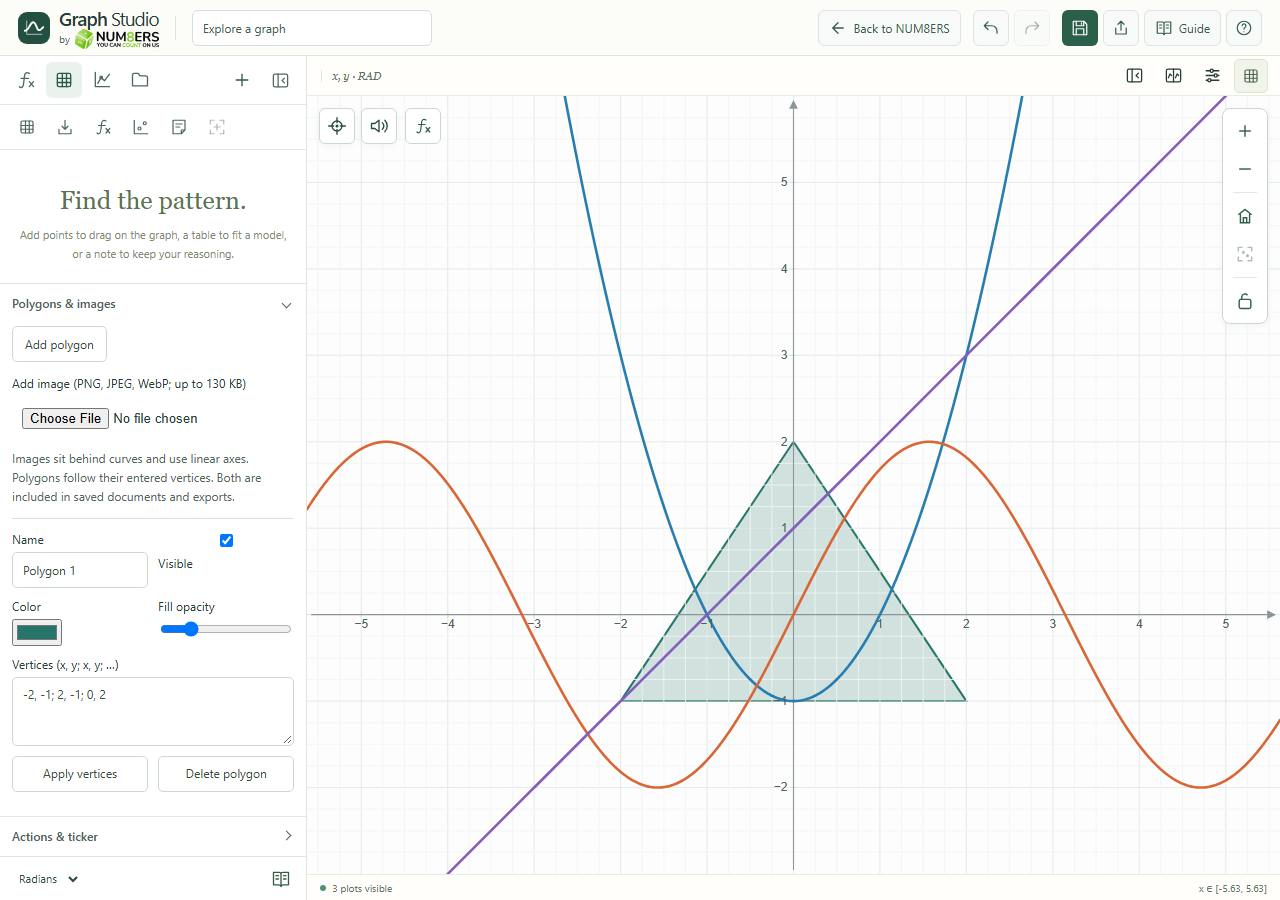
Use polygons for a geometric region and image overlays for a reference picture behind the graph.
Find it
Data → Polygons & images
Polygon controls edit its name, visibility, color, fill and ordered vertices.Click to enlarge ↗
Try it step by step
Choose Add polygon and enter its vertices in order.
Give it a name and adjust its color, fill opacity and visible state.
Choose an image file, then set its position, dimensions and appearance.
Save the document or export the graph to preserve the supported objects.
Options explained
Polygon vertices
The entered order determines the edges. Check the result when a polygon crosses itself.
Polygon styling
Name it, choose a color and fill opacity, and toggle Visible. Enter 3 to 64 finite coordinate pairs separated by semicolons and choose Apply vertices. Delete polygon removes it.
Image input
PNG, JPEG and WebP up to 130 KB. Use a suitably compressed image.
Image geometry
Set x, y, width, height, rotation and opacity; name, hide or delete the image as needed. Dimensions must be positive and rotation must be between -360 and 360 degrees.
Layering / axes
Images sit behind curves and use linear axes. Polygons follow their graph coordinates.
Exports
Supported objects are included in document saves and ordinary graph exports. Tactile output omits images and fills.