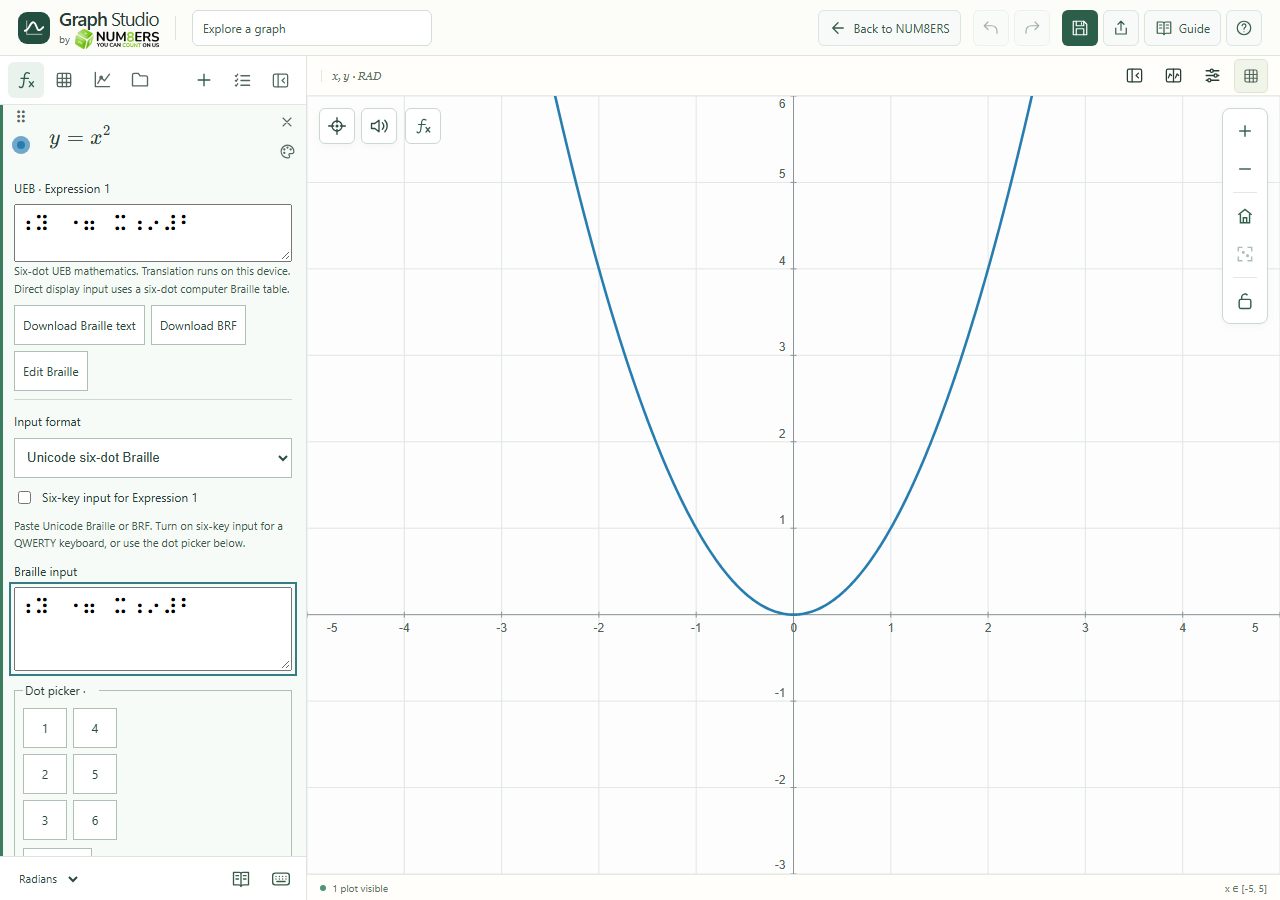
- UEB / Nemeth
- Select the mathematical Braille code that matches your material. The same dot pattern can mean different things in the two codes.
- Unicode / BRF
- Unicode uses Braille characters; BRF uses its ASCII representation. Use the format expected by your workflow.
- Six-key entry
- F, D, S enter dots 1, 2, 3; J, K, L enter dots 4, 5, 6. Press a chord and release it to enter a cell.
- Input preview
- Check the translation and diagnostics before applying. Invalid or unsupported notation is kept explicit.
- Dot picker
- Toggle dots 1 to 6 and choose Insert cell if six-key entry is inconvenient.
- Apply / cancel / reload
- Apply Braille commits a valid preview. Cancel leaves the expression unchanged. Reload from equation refreshes the draft; a changed source blocks applying an obsolete edit.
- Download / retry
- Download Braille text or BRF. Retry Braille translation if loading failed.
- Piecewise branches
- The structured editor lets you work on conditions and branch values separately.
- Coverage
- Supported fractions, powers, comparisons and other structures are translated; this is not a guarantee for every Braille convention or device.