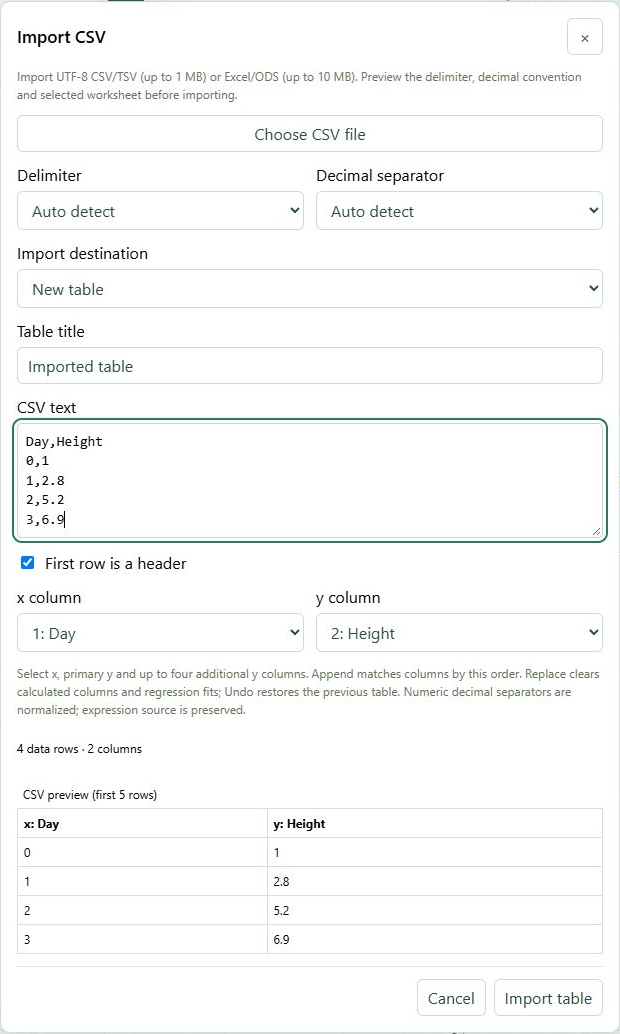
Preview your data before adding it, especially when its delimiter or decimal notation differs from the default.
Find it
Data → Import CSV
CSV import previews column mapping, delimiters and the destination before importing.Click to enlarge ↗
Try it step by step
Choose a CSV/TSV, Excel or ODS file, or paste CSV text.
For a workbook, select the worksheet. Check delimiter and decimal separator for text data.
Choose whether the first row is a header, then map the x and y columns and any additional y series.
Choose New table, Append rows or Replace table rows. Check the preview and select Import table.
Options explained
Delimiter
Auto detect, comma, semicolon, tab or pipe.
Decimal separator
Select the decimal convention used by the source data.
Worksheet
Select one sheet from a supported workbook; formulas and macros are not executed.
Table title / columns
Name a new table and map x, primary y and up to four additional y series.
Destination
Append adds rows to a selected table; Replace changes its rows. Undo can reverse a completed import.
Preview
Inspect the first five rows and validation messages before importing. Cancel closes without applying.
File limits
CSV: 1 MB of UTF-8 data, up to 32 columns and 256 characters per cell. Workbooks: 10 MB and up to 64 sheets. Imported values must fit the table limits.