
Skip to guide content
Graph Studio by NUM8ERSStudent guideOpen calculator
LEARN · TRY · EXPLORE

Export your work63 / 68

Export appearance & legends

Choose the dimensions and information that help a reader interpret your graph.

Find it

Export graph → Image options / More export options
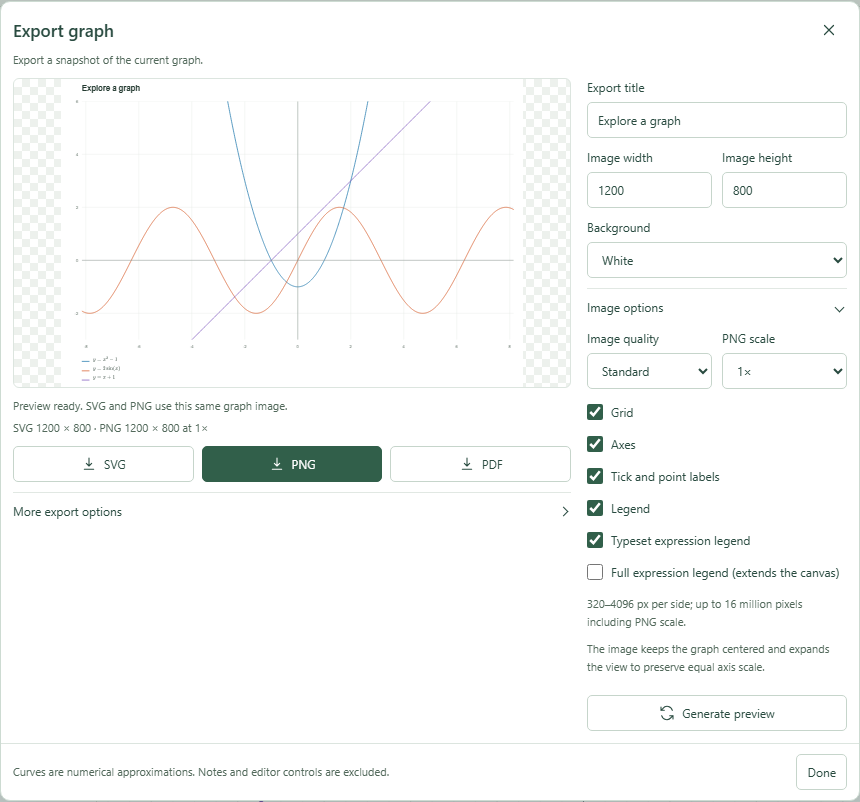
Image options control export dimensions, background, quality, labels and legend.
Image options control export dimensions, background, quality, labels and legend.Click to enlarge ↗

Try it step by step

  1. Set a title, image width and height.
  2. Choose the background, quality and PNG scale.
  3. Select which grid, axes, labels and legend content to include.
  4. Generate preview, check any warnings, then download the file.

Options explained

Dimensions
Each side accepts 320–4,096 pixels. The total output, including PNG scale, must fit the 16-megapixel budget.
Background
White or transparent.
Quality
Standard or High detail. Higher detail still uses finite sampling.
Grid / Axes / Labels
Controls exported grid, axes, tick/point labels and supported pinned labels.
Legend
Includes the graph’s plotted-source key. Typeset expression legend renders supported formulas mathematically.
Full legend
Extends the exported canvas when more room is required for the complete legend.
Saved canvas items
Saved numerical tangents/areas and eligible curve labels are included. Unsaved previews and sidebar notes are not a replacement for a saved canvas item.
Warnings
Read notices about omitted or unsupported content before using the export.

Screenshot

Copy this text

Your browser could not copy automatically. Select and copy the text below.