Data & statistics27 / 68
Regression with the ~ symbol
Fit a model directly in an expression using the table’s column names.
Find itExpressions; a table with named x and y columns
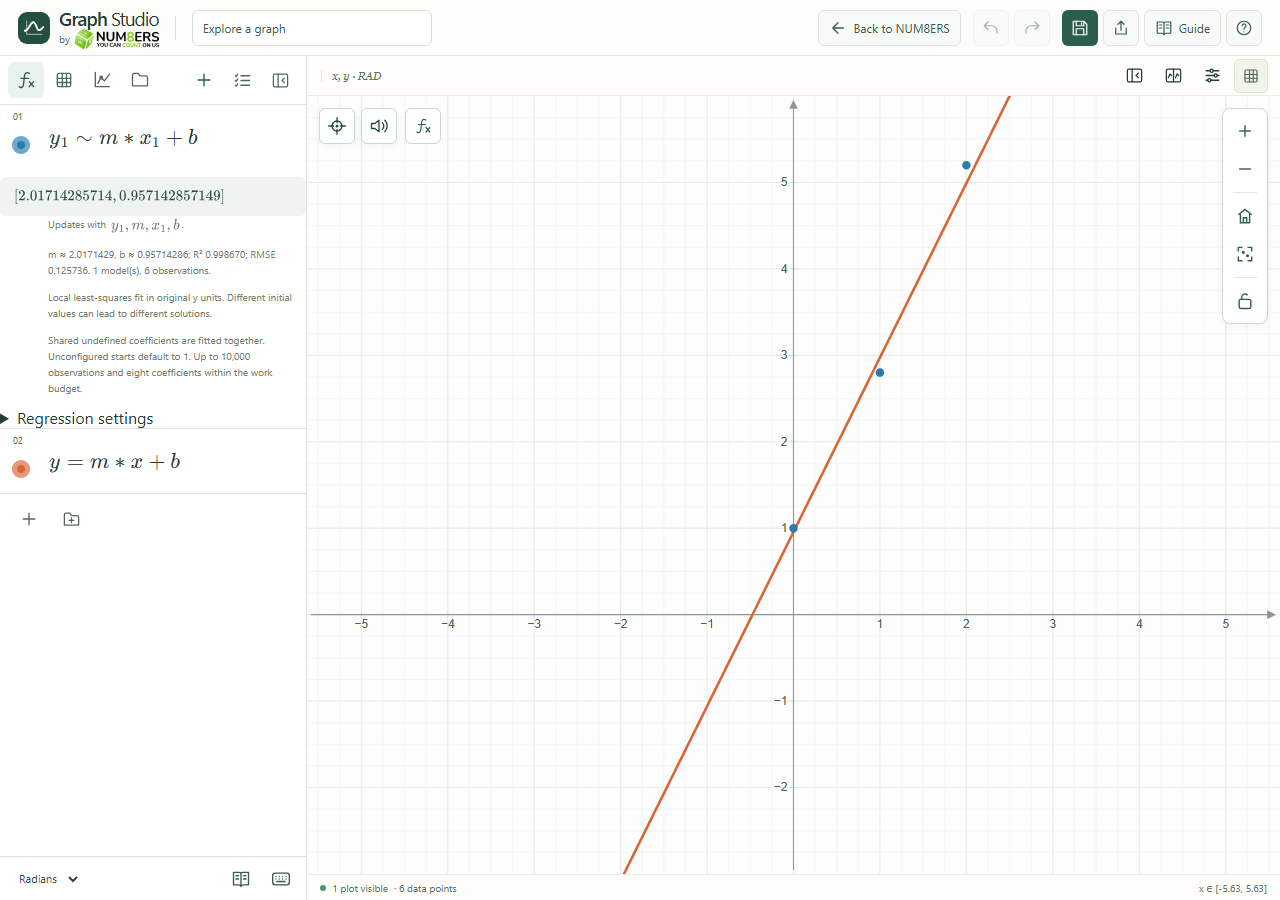 Tilde regression fits a model from table columns and exposes its coefficients.Click to enlarge ↗
Try it step by step
- Create a table whose column names are and .
- Enter in an expression row.
- Read the fitted parameter values and diagnostic details.
- Use the fitted coefficients in another expression to investigate the model.
Examples to try
Each card is one input. For definitions, enter the cards in order. Formula-only cards belong in the tool described above.
Fit a straight line to the table’s and lists.
Use the fitted parameters in a graph expression.
Options explained
- Tilde relation
- The ~ symbol requests regression rather than an ordinary equality.
- Live fitted parameters
- Fitted coefficient values update with the observations. Avoid unrelated definitions using the same coefficient names.
- Model functions
- Supported nonrecursive graph functions can expand into the model.
- Fit controls
- Where offered, adjust starting values, bounds, loss and multistart to improve a difficult fit.
- Validity
- Keep the same observation count across columns and check model domains. Unsupported or over-budget models report a diagnostic.

